
VMEG is an AI video translator that dubs videos into 170+ languages with natural voices, lip sync, and editable subtitles, built for creators, educators, and businesses.
About
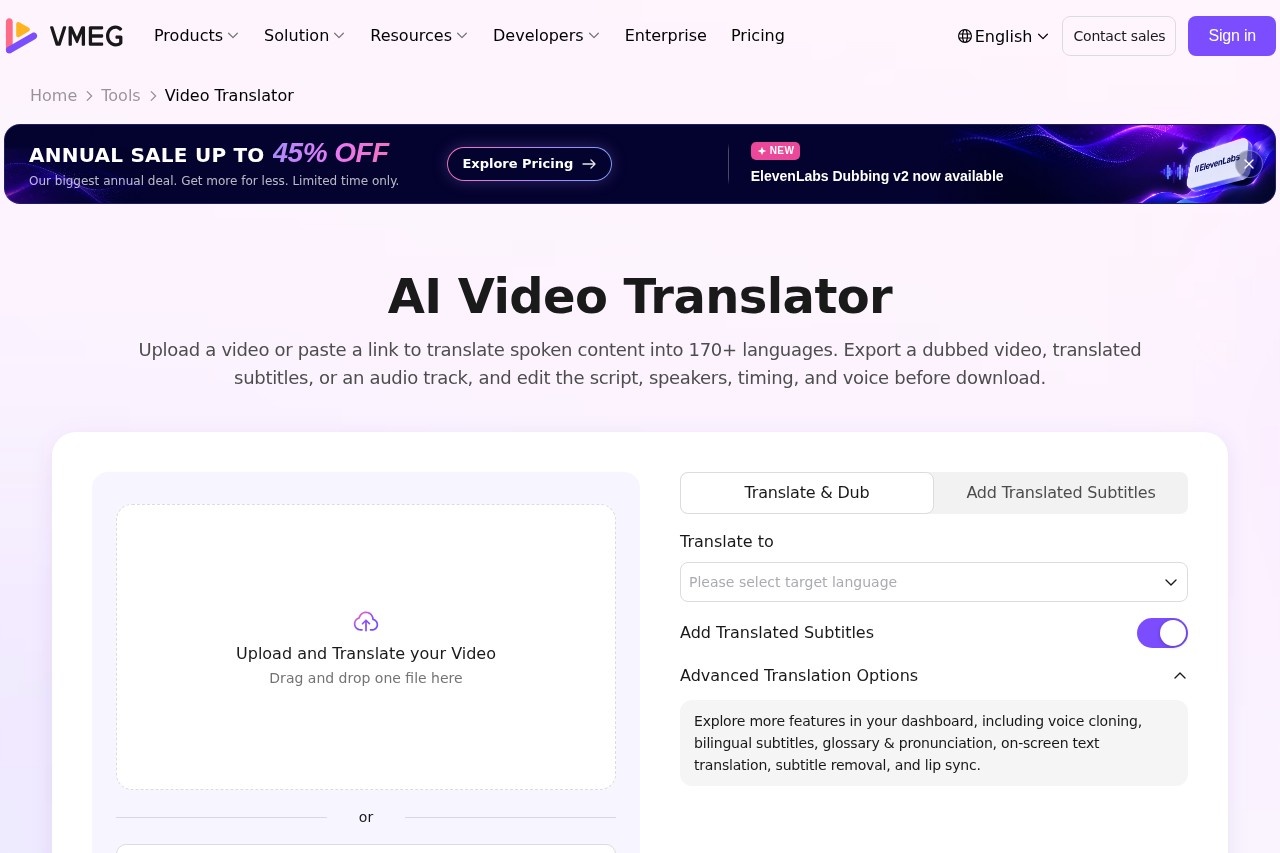
VMEG is an online AI video translation tool that converts spoken video content into more than 170 languages, producing a dubbed video, translated subtitles, or a standalone audio track. It addresses a common problem in video publishing: localizing content for international audiences normally requires separate transcription, translation, and voiceover work, plus audio syncing and editing tools. VMEG consolidates those steps into one workflow.
Users start by uploading a video file or pasting a supported public video link, then choose a target language and voice. VMEG handles transcription, translation, and voice synthesis, and lets users review the generated script, adjust speaker assignments, timing, voice speed, volume, and tone, and optionally add subtitles or lip sync before exporting. Advanced options include voice cloning, a library of over 17,000 AI voices, glossary and pronunciation controls, bilingual subtitles, and on-screen text translation. The tool can be used free of charge to start, with paid plans available on the VMEG site.
Key Features
Pricing & Fees
- Pricing: Not publicly listed on the pages we reviewed; check the official site for current plans. A free translation option is offered on the Video Translator page, and the site advertises a limited-time annual sale of up to 45% off.
- Input options: Accepts an uploaded video file, an existing workspace project, or a supported public video link, including YouTube links.
- Background audio handling: Music and non-speech audio can be kept separate from the translated dialogue, preserving the original video's structure.
- Data practices: VMEG states that it applies privacy-first design, enterprise-grade data protection, and strict data isolation and customer ownership of data.
Who It's For
VMEG is aimed at content creators and YouTubers who want to reach viewers in additional languages without hiring voice actors. Educators and trainers can use it to produce localized course and instructional videos, while businesses and marketing teams can prepare multilingual campaigns, e-commerce content, and corporate communications. It also fits agencies and production teams that need to localize videos in volume, thanks to batch processing and a structured workflow built for quality control and collaboration.
FAQ
What is VMEG's AI Video Translator?It is an online tool that translates the spoken content of a video into more than 170 languages and can export a dubbed video, translated subtitles, or an audio track.
Is VMEG free to use?The Video Translator page offers a free translation option to start; full pricing details are not publicly listed on the pages reviewed, so check the official site for current plans.
Can I translate a YouTube video by pasting a link?Yes, VMEG supports translating videos by pasting a supported public video link, including YouTube links, instead of uploading a file.
Can I export only translated subtitles?Yes, translated subtitles can be exported on their own, or together with a dubbed video or separate audio track.
How does VMEG handle privacy and data?According to the vendor, VMEG uses privacy-first design, enterprise-grade data protection, strict data isolation, and customer data ownership on infrastructure built for scale and compliance.
Related Tutorials
View all →
Related Tools
View all → Vidnoz AI Video Translator Vidnoz AI Video Translator is an online tool that translates videos into 140+ languages with voice cloning, lip-sync, and subtitle options for creators, marketers, and educators.
  Rask AI Rask AI is an AI video localization and dubbing platform that translates, voices, and captions video content in many languages for creators, marketers, and educators.
  AI Chat Assistant An AI chat assistant that answers questions, provides recommendations, and assists with tasks using advanced language models.
  ElevenLabs ElevenLabs is an AI audio platform for text-to-speech, voice cloning, dubbing, music, and conversational voice agents, serving creators, developers, and enterprises in 90+ languages.
  AI Studios AI Studios is DeepBrain AI's all-in-one platform for generating avatar-led videos from text, with 2,000+ AI avatars, 150+ languages of dubbing and text-to-speech, and interactive conversational agents.