
Vidnoz AI Video Translator is an online tool that translates videos into 140+ languages with voice cloning, lip-sync, and subtitle options for creators, marketers, and educators.
About
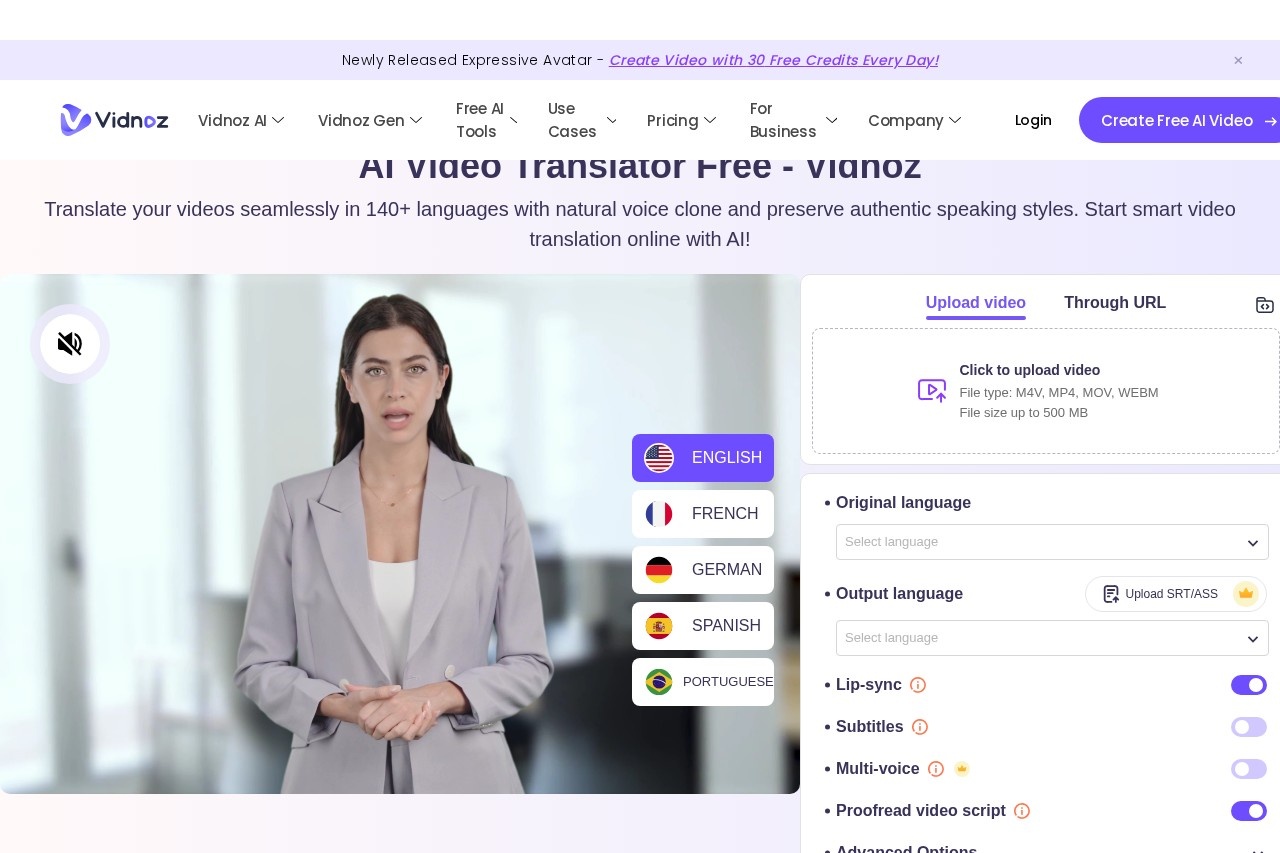
Vidnoz AI Video Translator is a browser-based tool from Vidnoz that translates spoken video content into more than 140 languages. It addresses a common problem for anyone publishing video: reaching viewers who do not speak the source language without hiring translators, voice actors, or editors. Instead of a manual workflow, the service transcribes the audio, translates it, and generates translated speech and subtitles in an automated pipeline.
The product sits inside the broader Vidnoz AI platform, which also offers AI avatars, video templates, text-to-speech, and other video and image tools. Users upload a video file (M4V, MP4, MOV, or WEBM, up to 500 MB) or paste a URL, pick source and target languages, choose options such as lip-sync or subtitles, and let the system process the clip. The translated video can then be previewed and downloaded from the same page.
Key Features
Pricing & Fees
- Pricing: Not publicly listed on the pages we reviewed; check the official site for current plans. The site does show a free tier and a "Vidnoz AI Video Translator Plan" alongside other Vidnoz subscription plans.
- Free tier limits: Free usage translates only the first 90 seconds of a video; paid options reference up to 800 minutes of translation, faster processing, up to 4K export, multispeaker voice, and no watermark.
- File support: Uploads accept M4V, MP4, MOV, and WEBM files up to 500 MB, or a video URL; users must confirm they own the video.
- Platform: Runs entirely online in a web browser, with no dedicated desktop app mentioned on the pages reviewed.
Who It's For
The tool is aimed at video creators and podcasters who want existing footage to reach new language markets, businesses and marketers localizing product or social media videos, and teachers and trainers producing instructional content for multilingual learners. Language learners can also use it to hear material in a target language. It fits best when a team needs repeated, fast localization of talking-head or presentation-style videos and is willing to review the generated scripts for accuracy.
FAQ
What is Vidnoz AI Video Translator?It is an online AI tool that translates videos into more than 140 languages, producing translated audio with optional voice cloning, lip-sync, and subtitles.
Is there a free version?Yes, but free usage is limited to translating the first 90 seconds of a video, with output watermarked; paid plans unlock longer translations and premium features.
What file formats and sizes are supported?Uploads accept M4V, MP4, MOV, and WEBM files up to 500 MB, and videos can also be submitted through a URL.
Does it preserve the original speaker's voice?Yes, the voice cloning feature generates translated speech that keeps the original speaker's voice and speaking style, and multi-voice mode handles videos with several speakers.
Can subtitles be translated separately from the audio?Yes, a "translate subtitles only" mode keeps the original audio while translating captions, and users can upload proofread SRT/ASS files for greater accuracy.
Related Tutorials
View all →
Related Tools
View all → VMEG VMEG is an AI video translator that dubs videos into 170+ languages with natural voices, lip sync, and editable subtitles, built for creators, educators, and businesses.
  Rask AI Rask AI is an AI video localization and dubbing platform that translates, voices, and captions video content in many languages for creators, marketers, and educators.
  AI Chat Assistant An AI chat assistant that answers questions, provides recommendations, and assists with tasks using advanced language models.
  ElevenLabs ElevenLabs is an AI audio platform for text-to-speech, voice cloning, dubbing, music, and conversational voice agents, serving creators, developers, and enterprises in 90+ languages.
  AI Studios AI Studios is DeepBrain AI's all-in-one platform for generating avatar-led videos from text, with 2,000+ AI avatars, 150+ languages of dubbing and text-to-speech, and interactive conversational agents.