
PhoText is a free browser-based AI tool that lets users edit, replace, remove, add, and translate text inside images and screenshots without design skills.
About
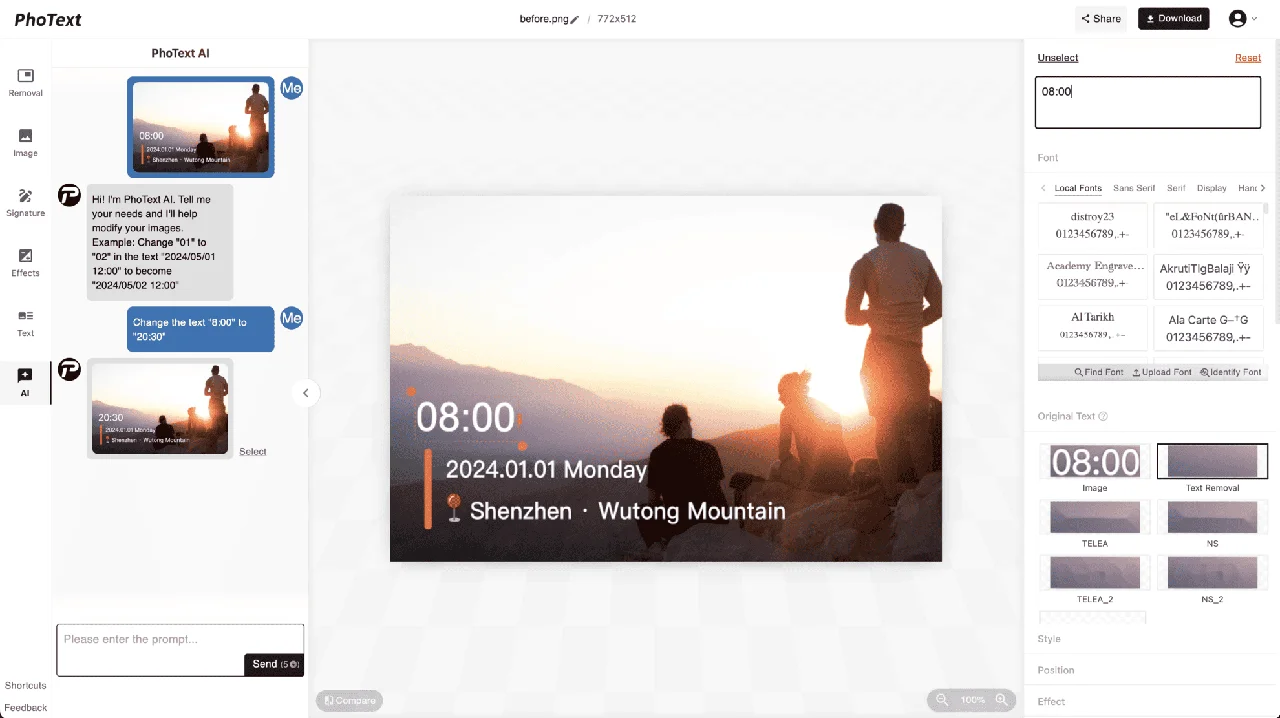
PhoText is an online, AI-assisted editor for changing text that is already embedded in images and screenshots. Flattened files such as JPEGs and PNGs contain no editable text layers, so fixing a typo on a poster or updating a price on a product banner normally requires rebuilding the graphic in design software. PhoText addresses this by letting a user click any text in the image and type a replacement, with the AI handling font matching, background repair, and style alignment.
The workflow has three steps: upload the image (JPG, PNG, JPEG, WEBP, or PDF), click the text to change and enter the new wording, then download the result. A conversational mode can also carry out the whole edit from a written instruction. Beyond text editing, the site offers related tools for removing watermarks, translating text within images, identifying fonts, scanning documents with OCR, and editing PDF text. PhoText is operated by Morling, LLC, and runs in the browser on desktop and mobile without installation.
Key Features
Pricing & Fees
- Pricing: Not publicly listed on the pages we reviewed; check the official site for current plans.
- Free tier: Basic features are free, with a free trial allowance for advanced capabilities; the vendor states there are no hidden costs.
- Commercial use: All fonts distributed by the platform and all output content are licensed for commercial use at no charge.
- File support: Uploads accept JPG, PNG, JPEG, WEBP, and PDF, and the editor can export high-resolution images.
- Privacy: Edited images are automatically deleted after 3 days for guests and 30 days for logged-in users, and the company states it does not collect photos, device data, or location for advertising or resale.
Who It's For
PhoText suits anyone who needs to alter text in images without the original design files. Typical users include social media managers updating promo graphics, e-commerce sellers revising prices or labels on product images, small business owners correcting typos on flyers and posters, translators localizing text inside screenshots or marketing visuals, and designers who need a fast alternative to Photoshop for one-off text fixes. It is also useful for general office tasks such as correcting a date or number in a screenshot when the source file is unavailable.
FAQ
What is PhoText?PhoText is a free, AI-powered online tool for editing, replacing, removing, adding, and translating text inside images and screenshots directly in the browser.
Is PhoText free to use?Basic features are free, and advanced features come with a free trial quota; paid plan details are not publicly listed on the pages reviewed, so the official site should be checked for current pricing.
Which platforms and file formats does PhoText support?It runs as a web application on desktop and mobile with no installation, and accepts JPG, PNG, JPEG, WEBP, and PDF files.
Can PhoText edit a flattened JPEG or PNG with no text layers?Yes, that is its core purpose — OCR reads the embedded text and the AI matches the original font and background so the edit fits the image.
What happens to uploaded images?Edited images are automatically cleared from the servers after 3 days for guests and 30 days for logged-in users, and the company states it does not collect user photos or device information for advertising or data resale.
Related Tutorials
View all →
Related Tools
View all → Canva Canva is a versatile graphic design platform offering templates and tools for creating stunning visuals. It's user-friendly for both beginners and professionals.
  Editaimg - AI-Powered Image Editing and Translation Tools Editaimg is a versatile online platform that leverages AI to simplify complex photo editing tasks. It offers specialized features for both creative and practical use.
  PicReword Picreword is an online AI image text editor for fixing typos, replacing headlines, and updating image copy without needing the original design files.
  Manga Translator AI manga translator supporting 50+ languages: upload manga images for automatic OCR, in-place bubble translation with smart typesetting, batch and background processing.
  PDNob Image Translator PDNob Image Translator is a desktop app from Tenorshare that uses AI OCR to extract and translate text from images, screenshots, and scanned documents into 100+ languages locally.