
Dictanote is a note-taking app with built-in voice typing that lets users dictate notes in 50+ languages, switching freely between the keyboard and speech.
About
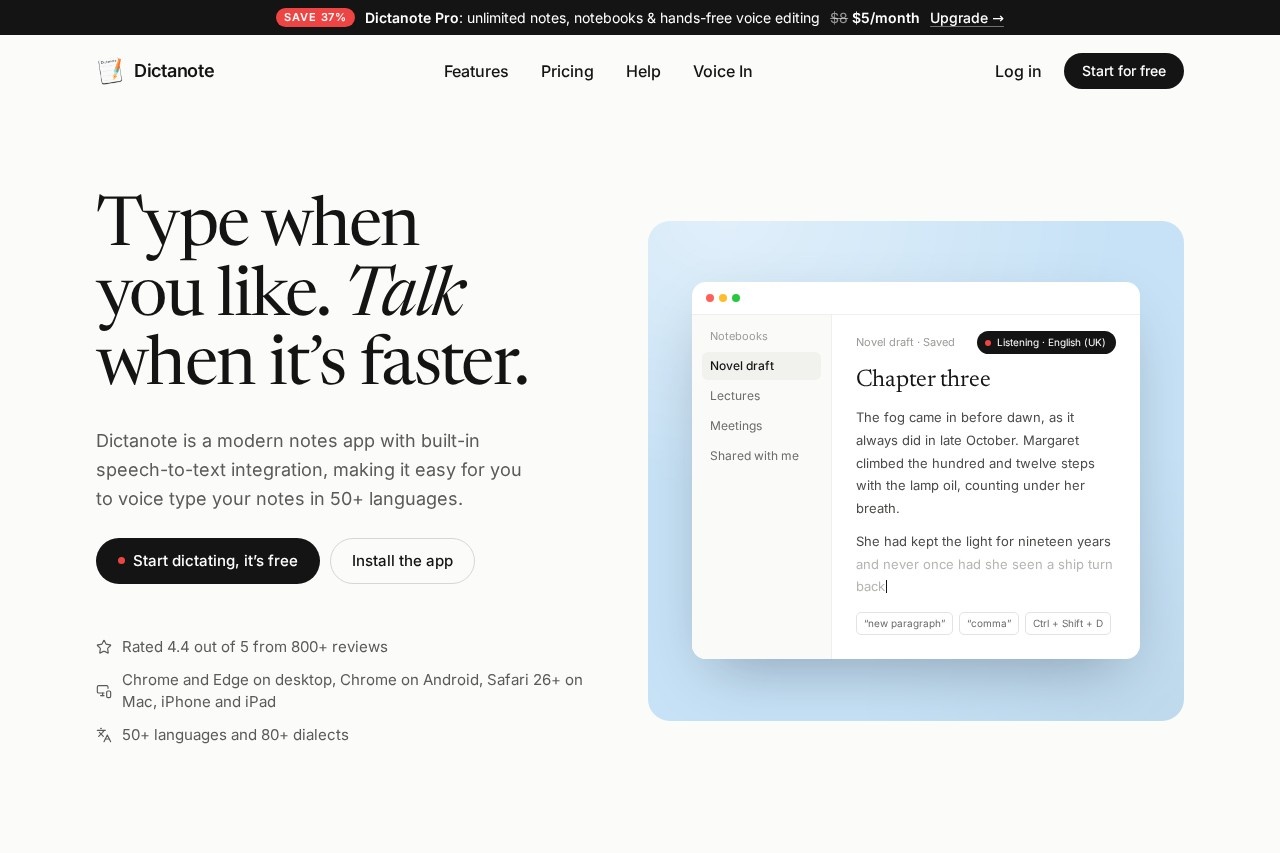
Dictanote is a notes application with speech-to-text built in, designed for people who find speaking faster than typing. Instead of choosing between dictation software and a notes app, users get both in one place: they can press a shortcut to dictate a paragraph, then switch back to the keyboard to edit it. The service supports more than 50 languages and 80+ dialects, so it works for multilingual writers as well as English speakers.
The app runs in Chrome and Microsoft Edge on Windows, Linux and Mac, in Chrome on Android, and in Safari 26 or later on Mac, iPhone and iPad. Notes save automatically, sync to the cloud, and can be read and edited offline. Dictanote also offers related tools from the same team, including Voice In for dictating on any website, AudioScribe for rewriting voice notes, and Transcribe for converting pre-recorded audio files into text. A free plan is available, with a paid Pro tier for heavier users.
Key Features
Pricing & Fees
- Pricing: A Free plan ($0) allows up to 50 notes in one notebook and 60 minutes of dictation per day. Pro costs $8/month, or $5/month billed yearly ($60 per year), with a 30-day money-back guarantee.
- Free tier: The free plan includes voice commands for punctuation and formatting, checklists, tables, links, offline sync, and export to PDF, HTML and text.
- Pro additions: Unlimited notes and notebooks, unlimited hands-free dictation, password-protected notes, voice editing, custom voice commands, sharing with up to 10 people, and images in notes.
- Reception: The vendor reports more than 100,000 users and a rating of 4.4 out of 5 from 800+ reviews.
Who It's For
Dictanote suits people who think out loud. Writers can talk through a chapter draft and refine it with the keyboard afterward. Students can keep a separate notebook per subject for lecture notes. Professionals can capture decisions during meetings and share the note with colleagues. It also serves anyone who finds speaking easier than typing, such as people keeping lists or journals, and users whose accents are poorly handled by other dictation tools, including Indian English speakers.
FAQ
What is Dictanote?Dictanote is a notes app with built-in speech-to-text that lets users dictate notes in 50+ languages and switch between voice and keyboard input.
Does Dictanote have a free plan?Yes. The free plan includes up to 50 notes in one notebook and 60 minutes of dictation per day, with no credit card required.
What platforms does Dictanote run on?It works in Chrome and Microsoft Edge on Windows, Linux and Mac, in Chrome on Android, and in Safari 26 or later on Mac, iPhone and iPad, and can be installed as a standalone app.
Can Dictanote be used offline?Notes can be read and edited offline and sync when the connection returns, but dictation itself requires an internet connection.
How does Dictanote handle privacy?Notes are stored encrypted on Dictanote servers, and the service does not store or process user audio; it uses the browser's speech-to-text service to convert speech into text.
Related Tutorials
View all →
Related Tools
View all → Heidi Heidi is an AI care partner for clinicians that automates medical documentation, transcription, research, and administrative tasks across every stage of patient care.
  AI Translator - Accurate Translation AI Translator provides high-accuracy translations with 98% precision, supporting 1200+ AI models and 100+ languages.
  Plaud.ai - World's No.1 AI Note-taking Plaud.ai is the world's leading AI note-taking tool, transforming conversations into accurate, organized notes with over 100 languages supported.
  Tactiq Tactiq is an AI meeting assistant that transcribes Google Meet, Zoom, and Teams calls live in the browser, then generates summaries, action items, and workflow automations.
  AI Interview Copilot An AI assistant that provides real-time help during job interviews, transcribing speech in 57 languages, recognizing screenshots, and generating answers to technical and algorithmic questions.