
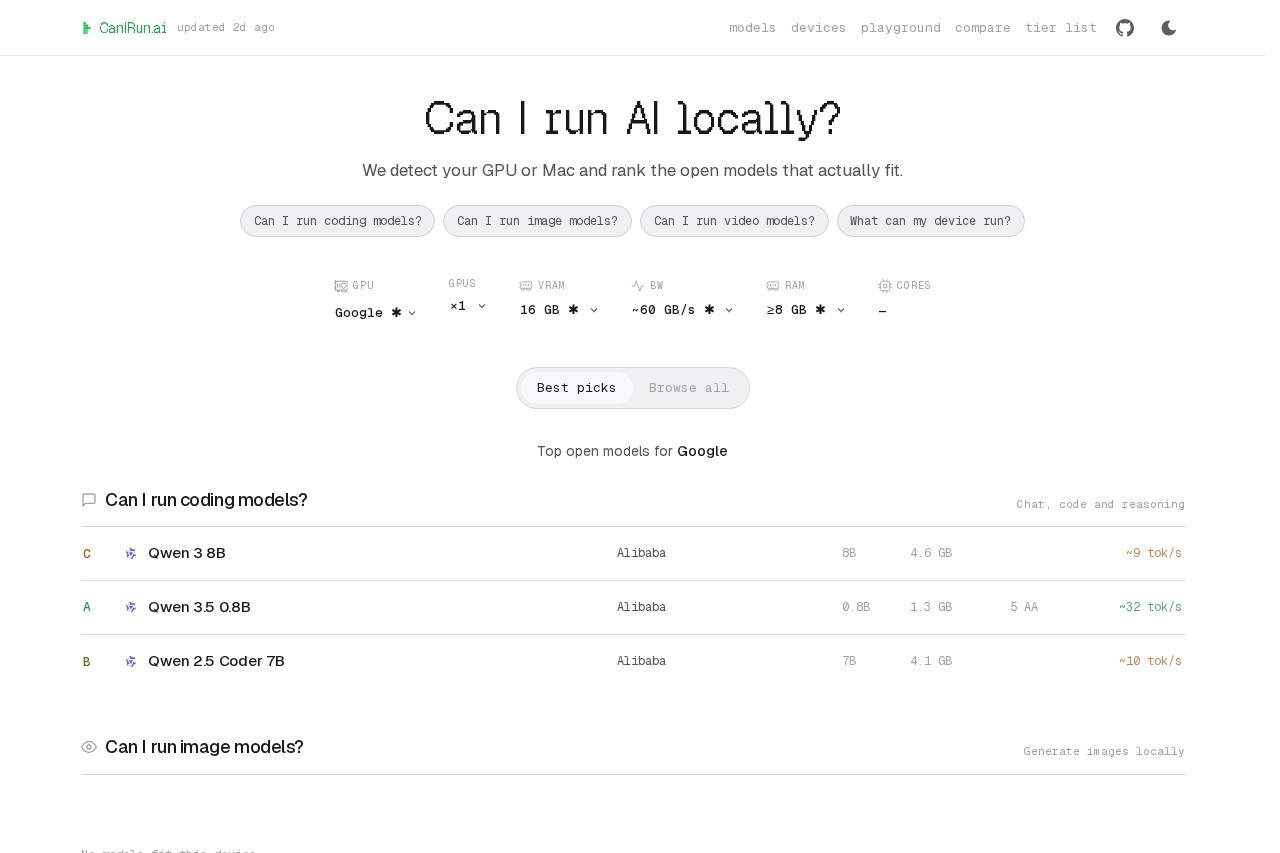
A browser-based hardware analyzer that detects your GPU or Mac and grades which open-weight chat, coding, image and video AI models will actually run locally on your device.
About
CanIRun.ai answers a question every local AI user eventually faces: can my computer actually run this model? Instead of guessing at VRAM requirements or trial-and-error downloads, the site detects your GPU or Mac directly in the browser and grades an entire catalog of open-weight models against your specific hardware. Each model receives a letter grade from S down to F, based on estimated speed, VRAM headroom, and model quality, so users can see at a glance what fits comfortably, what is a tight fit, and what is out of reach.
The site organizes its catalog into four task categories: chat, code and reasoning models; image generation; video generation; and tiny on-device models of 4B parameters and under. Coverage includes releases from Alibaba, Meta, Google, OpenAI, Black Forest Labs, Tencent, Ideogram, Krea, Lightricks, and others, with filters for license, popularity, context length, speed, and VRAM. It also offers pages that list models by device family, including RTX and Radeon graphics cards, Apple Silicon, phones, and Raspberry Pi, plus VRAM tiers from 8GB to 32GB and above. Pricing is not publicly listed on the pages we reviewed; check the official site for current plans.
Key Features
Pricing & Fees
- Pricing: Not publicly listed on the pages we reviewed; check the official site for current plans.
- Platform: Runs in the browser; hardware detection works for GPUs and Macs, and the device catalog also covers phones and Raspberry Pi.
- Model coverage: Includes open-weight models from Alibaba (Qwen, Wan, Z-Image), Meta, Google, OpenAI (GPT-OSS), Black Forest Labs (FLUX.2), Tencent (Hunyuan), Ideogram, Krea, Lightricks, and more.
- Additional tools: The site navigation includes a playground, a compare view, and a tier list alongside the main model and device catalogs.
- License transparency: Every model entry states its license, such as Apache 2.0, MIT, or a non-commercial license, so users can check commercial-use rights before downloading.
Who It's For
CanIRun.ai is written for anyone who wants to run AI models locally rather than through a cloud API. That includes hobbyists building a home AI setup, developers choosing a coding or reasoning model that fits their graphics card, and creators evaluating whether their hardware can handle local image or video generation. It is equally useful for people planning a GPU purchase who want to see which VRAM tier unlocks which models, and for owners of low-end machines looking for the lightest 4B-and-under models that still run on constrained hardware.
FAQ
What is CanIRun.ai?CanIRun.ai is a browser-based tool that detects your GPU or Mac and grades open-weight AI models—chat, coding, image, and video—by whether they can run on your specific hardware, using estimated speed, VRAM headroom, and model quality.
Is CanIRun.ai free to use?Pricing is not publicly listed on the pages we reviewed, so the cost structure cannot be confirmed; check the official site for current plans.
Which devices and hardware does it support?It detects GPUs and Macs in the browser and publishes curated model lists for RTX, Radeon, Intel Arc, Apple Silicon, phones, and Raspberry Pi, plus VRAM tiers from 8GB to 32GB and above.
What information does it show for each model?Each entry lists parameter count, architecture (dense or mixture-of-experts with active parameter counts), license, release date, context window, VRAM needs, and available quantization levels such as Q4_K_M and F16.
Does the site upload my hardware data anywhere?The site does not describe its data handling in the pages reviewed; hardware detection happens in the browser, but users should review the official site's privacy terms for specifics.
Related Tutorials
View all →

Related Tools
View all → Qwen AI - Multimodal Assistant Qwen AI is a versatile assistant that handles text, images, and more, providing comprehensive support.
 Hugging Face Hugging Face is an open community platform where machine learning practitioners host, discover, and collaborate on over two million models, datasets, and AI applications.
 Llama Llama 4 is a powerful AI model family with Scout and Maverick versions. Experience advanced AI capabilities.
 LTX 2 AI Video Generator - Create Stunning Videos Free Online Transform your ideas into amazing AI-generated videos with LTX 2 Video Generator. Create professional videos online for free. No experience required. Start generating now.
 Mistral AI - Open AI Alternative Mistral AI provides enterprises with customizable AI platforms for deploying assistants, agents, and multimodal AI using open models.