
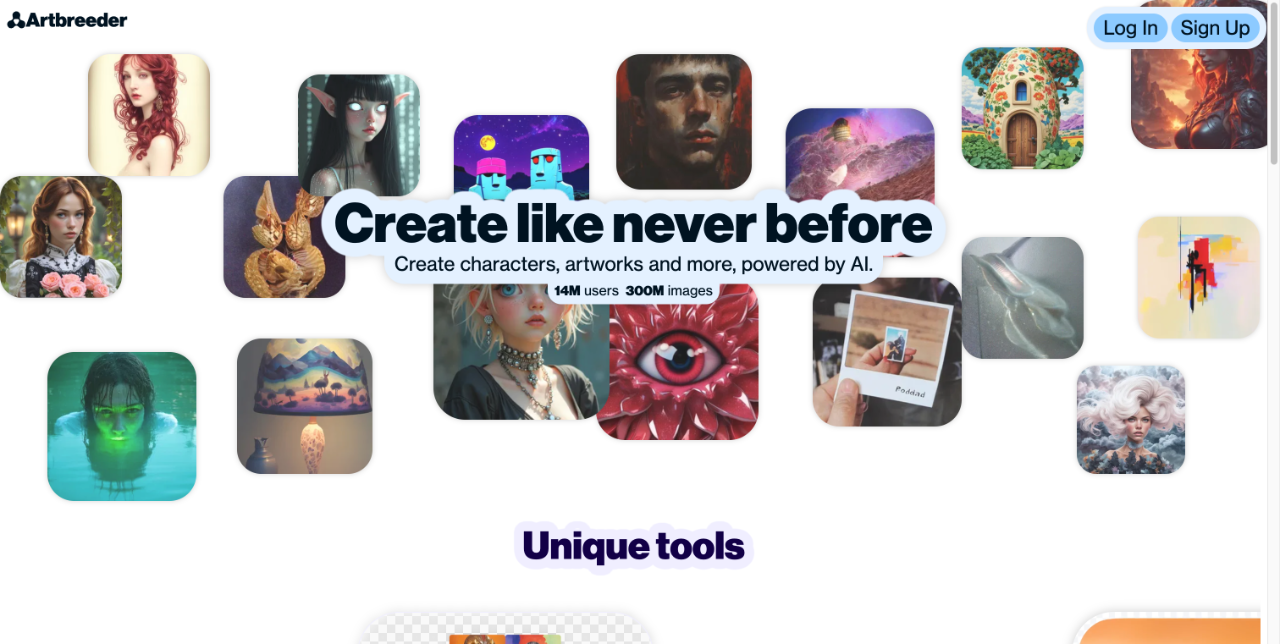
Artbreeder is a web-based tool for creating and remixing images with AI, letting users blend and refine portraits, characters and landscapes through collaborative breeding.
About
Artbreeder is an online platform for generating and modifying images with the help of artificial intelligence. Its core idea is that images are not created in isolation: users can take an existing picture, adjust its characteristics through sliders, and cross it with other images to produce new variations, an approach the site describes as collaborative image creation.
The service runs entirely in a web browser, so no software installation is required. After signing up, users work with gene-based editing controls that change attributes of an image, and every result can be shared, remixed, and further modified by others in the community. This collaborative loop means the public library of images keeps growing as people build on each other's work. Artbreeder has become a common starting point for character portraits, science-fiction and fantasy scenes, and concept art where exploring many variations quickly matters more than pixel-level control.
Key Features
Pricing & Fees
- Pricing: Not publicly listed on the pages we reviewed; check the official site for current plans.
- Platform availability: Accessible through the Artbreeder website at artbreeder.com with a web browser; a user account is required for signing in and saving work.
- Free tier: A sign-up option is available on the site, indicating that some level of free access exists alongside paid options.
- Collaborative model: Results can be published to the community, where others can breed and modify them further.
Who It's For
Artbreeder suits digital artists and illustrators who need to iterate quickly through many visual variations of a character or environment. Novelists, tabletop game masters, and worldbuilders use it to visualize cast members and settings. Concept artists in games and film use it for early exploration before committing to detailed work. Hobbyists who enjoy experimenting with AI image creation also form a large share of its community, since the remixing model rewards browsing and modifying other people's images.
FAQ
What is Artbreeder?Artbreeder is a collaborative web-based tool for creating and modifying images with AI, where users blend images together and adjust their traits with gene-style sliders.
Is Artbreeder free to use?The site offers free sign-up, so users can create images at no cost; details of any paid plans are not publicly listed on the pages we reviewed, so check the official site for current options.
What platforms does Artbreeder run on?Artbreeder runs in a web browser through its official site and does not require installing desktop software.
Can other users modify my images on Artbreeder?Yes, the platform is built around collaboration, and images can be shared and remixed by other users, which is a central part of how the tool works.
What kinds of images can you create with Artbreeder?It is widely used for portraits, characters, landscapes, and concept art, with editing controls tailored to each category.
Related Tutorials
View all →

Related Tools
View all → AI Couple Photo Transform two photos into photorealistic couple portraits instantly. Multiple artistic styles, free downloads, no photography studio required.
 OpenArt OpenArt is an all-in-one AI creative suite that generates and edits images, video, characters, and audio from text or reference media for creators and brands.
 NovelAI NovelAI is a subscription-based platform that combines AI anime image generation with an AI story writing assistant, built for artists, writers, and content creators.
 GhibliArt.ai GhibliArt.ai is an online AI image generator that turns text prompts or uploaded photos into Ghibli-style art, chibi emojis, action figures, comics, and coloring pages, with a free tier.
 A1.art - AI Video & Image Generator Create stunning AI-generated videos and images with a1.art. Unleash your creativity with powerful, easy-to-use tools.