
A free browser-based audio converter by 123apps that converts files between MP3, WAV, M4A, FLAC, OGG and more, extracts audio from video, and edits track tags.
About
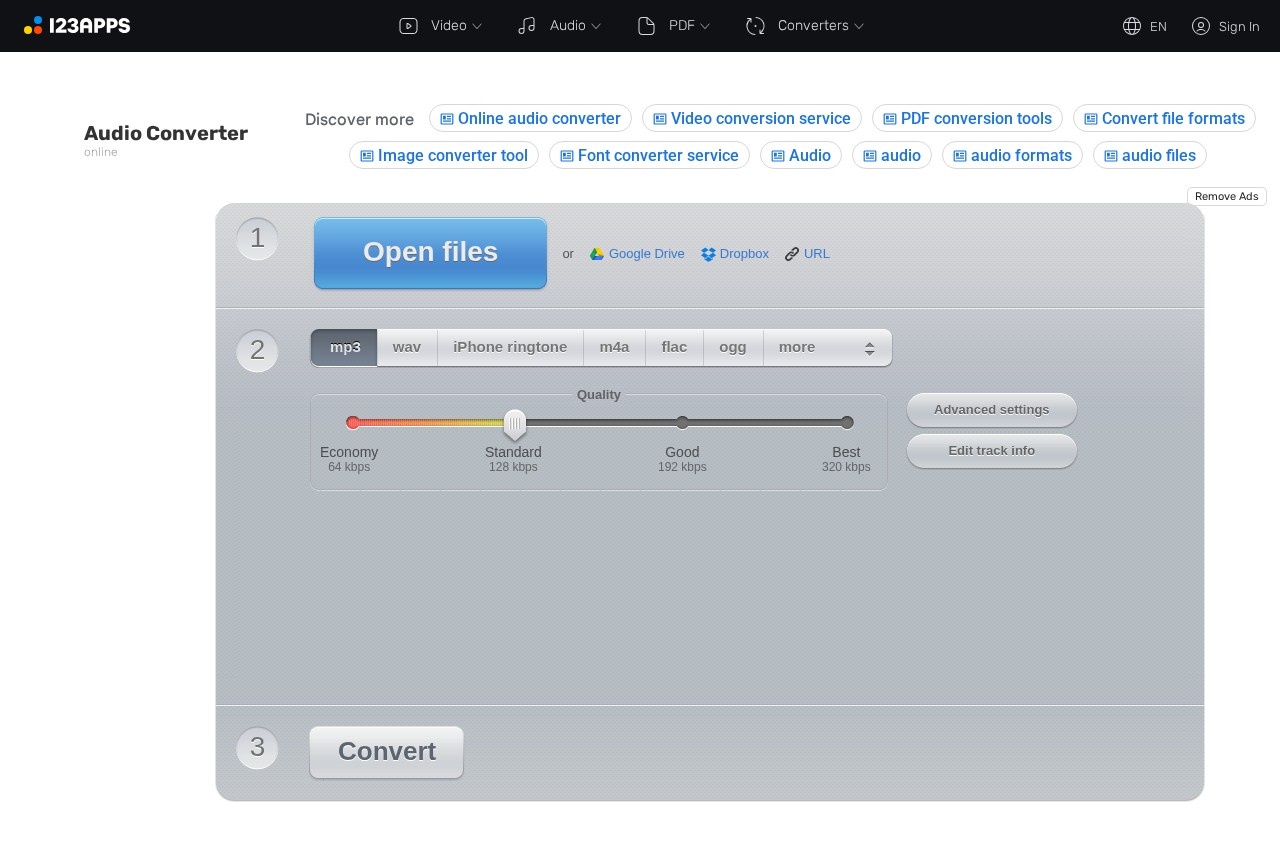
Online Audio Converter is a free web application from 123apps that converts audio files between a wide range of formats without requiring any software installation. It addresses a common problem: audio files arrive in formats that a phone, editor, or music player cannot play, and desktop converters are often bulky or paid. This tool runs entirely in the browser, so users upload a file, pick an output format and quality, and download the result within minutes.
The service accepts more than 300 input formats, including video formats, and outputs MP3, WAV, M4A, FLAC, OGG, AMR, MP2, and M4R for iPhone ringtones. Beyond straight conversion, it can pull an audio track out of a video file, adjust bitrate and sample rate, apply fades or reverse playback, and edit ID tags. It is part of the 123apps suite of browser-based video, audio, PDF, and document tools.
Key Features
Pricing & Fees
- Pricing: Free to use with ads and limits; a Premium plan costs $6 per month or $48 per year and covers all 51 123apps tools.
- Free tier limits: Free accounts can process up to 70 files per day with a maximum file size of 4 GB; Premium raises the limit to 10 GB with unlimited daily files and no ads.
- Privacy: Uploaded files are automatically deleted from the servers a few hours after the work session ends, and the vendor states no one else has access to them.
- Languages: The interface is available in more than a dozen languages, including English, Spanish, French, German, Japanese, and Chinese.
Who It's For
Online Audio Converter suits anyone who needs occasional format conversion without installing desktop software. Typical users include musicians and podcasters preparing audio for distribution, video editors exporting narration or music from footage, students working with lecture recordings, and phone owners creating custom ringtones in M4R format. The batch mode and cloud saving options also make it practical for people who need to convert several files at once, such as librarians digitizing collections or content creators preparing assets for different platforms.
FAQ
Is Online Audio Converter free to use?Yes, the tool is free with ads and a limit of 70 files per day and 4 GB per file; a Premium subscription at $6 per month removes ads and raises the limits.
Which audio formats can it convert to?It converts to MP3, WAV, M4A, FLAC, OGG, AMR, MP2, and M4R, accepting more than 300 input formats including video files.
Can it extract audio from a video file?Yes, the app can pull the audio track out of a video, which is useful for saving a song from a movie or music video.
Do I need to install anything to use it?No, the converter runs in a web browser, and finished files can be downloaded or saved to Google Drive or Dropbox.
What happens to my uploaded files?Files are automatically deleted from the servers a few hours after the session, and the vendor states only the user has access to them.
Related Tutorials
View all →
Related Tools
View all → MiniMax AI Video Generator MiniMax is an AI video generator that produces high-quality videos from text prompts, streamlining video creation.
  AI Image Enhancer Enhance and upscale images with AI, improving resolution and quality while preserving details.
  Tunee - AI Music Generator Tunee is an AI-powered music generator that creates original songs and melodies from text prompts, perfect for creators and musicians.
  Audjust AI - AI Audio Enhancer & Voice Changer Audjust AI uses advanced AI to enhance audio quality, remove noise, and transform voices. Perfect for podcasts, videos, and social media content like Reels.
  Stable Audio Stable Audio is an AI-powered tool for generating high-quality audio content.