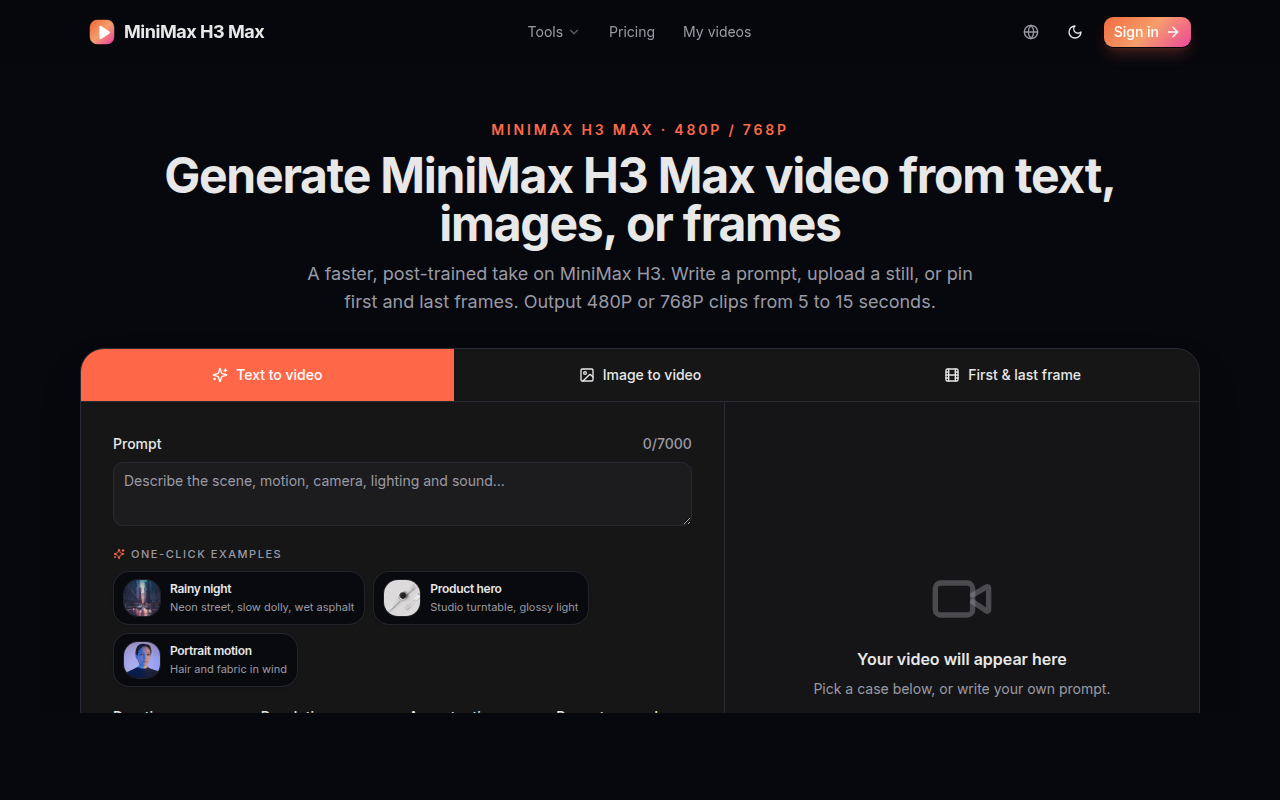
MiniMax H3 Max is an AI video generation tool powered by text, images, or first-and-last frames: it supports 480P/768P output, 5–15 second clips, and multiple aspect ratios from 21:9 to 9:16, with per-second billing—ideal for rapidly producing short video content.
Last UpdatedOct 18, 2026
About
MiniMax H3 Max is a third-party online AI video generation tool built around the post-trained version of the MiniMax H3 model, supporting direct video generation through three input methods: text prompts, static images, or first frame + last frame. Its core differentiation lies in the combination of "multimodal input + fine-grained output control": on one hand, text, image, and first/last frame inputs cover the complete creation pipeline from scratch to finished clips; on the other hand, two resolution tiers (480P/768P), 6 aspect ratios, and variable durations of 5–15 seconds are all integrated within a single tool, freeing output specs from fixed templates. For teams that need to quickly produce concept videos, product showcases, or social media content, H3 Max's value lies in compressing "video generation" from a high-cost post-production process into a single instant operation with parameter configuration. The site is clearly structured into three sections—Tools, Pricing, and My videos—with an intuitive workflow, and its credit-based billing model accommodates usage levels ranging from light experimentation to batch generation.
Key Features
Text-to-Video (T2V): Enter a single natural language prompt to generate a 5-15 second video. The system includes a built-in prompt expansion feature that automatically expands brief descriptions into more complete visual instructions, reducing the likelihood of generation failures caused by insufficient descriptions.
Image-to-Video (I2V): Upload a static image and the model infers motion trajectories and dynamic details based on the image content, making it ideal for transforming product images, illustrations, or portrait photos into dynamic clips with camera movement effects.
First Frame + Last Frame Animation: Specify both the first and last frames, and the model generates the transition animation between them. This approach is well-suited for scenarios that require precise control over start and end states, such as shot transitions, scene changes, and slow-motion loops.
Output Specification Configuration: Choose between 480P or 768P resolution; adjust the duration within the 5-15 second range; and select from 6 aspect ratios—21:9, 16:9, 4:3, 1:1, 3:4, and 9:16—to suit landscape cinematic looks, square social media posts, vertical short videos, and a variety of other publishing channels.
One-Click Examples: Built-in preset scenarios such as a rainy neon-lit street, a product turntable, and flowing portrait hair allow you to load example prompts and parameters with a single click, making it easy to quickly test the results or reuse and modify them as prompt templates.
Quality Tier Selection: Quality tiers can be switched directly within the generation interface, letting you strike a balance between generation speed and visual detail to meet usage needs under different budgets and time constraints.
Who It's For
Short-video content creators: Those who need to continuously produce visual footage for channels like Douyin, Bilibili, and YouTube Shorts, using text prompts or first-and-last-frame methods to quickly generate background visuals and transition clips, reducing live-shooting and editing costs.
E-commerce and product marketers: One-click examples like product turntables and multi-angle displays can quickly produce product hero videos and dynamic content for detail pages, delivering dynamic showcase materials without a professional studio.
Advertising and film pre-production teams: Before formal shooting or 3D rendering, generate camera-movement reference videos using the first-and-last-frame method to support storyboard communication, dynamic previsualization, and pitch presentations.
Social media managers and brand designers: Transform static posters, illustrations, or brand visuals into dynamic videos that match social media aspect ratios like 1:1, 3:4, and 9:16 to boost content engagement.
AI tool enthusiasts and indie developers: Experience the latest capabilities of video generation models at low cost through a credit-based system, validate creative ideas, or build personal automation workflows around generated assets.
More
Key Advantages
Tri-modal input covers the complete creative pipeline: From text-only video creation and animating static images to precise first-and-last-frame control, it covers nearly all common AI video generation workflows, avoiding the cost of switching between multiple tools.
Flexible parameter combinations: Resolution, duration, and aspect ratio can all be configured independently. The same footage can be quickly exported in both a 16:9 landscape version and a 9:16 portrait version to fit different platform requirements, rather than being constrained by fixed templates.
Low barrier to entry: One-click examples let new users see finished video results without needing to master prompt engineering; the Prompt expansion feature further reduces the rework costs caused by "inaccurate descriptions."
Transparent billing model: Credits are consumed based on generated duration—1 credit per second for 480P and 2 credits per second for 768P—with simple, clear rules. There are no hidden fees between the two pricing tiers, making it well suited to individual creators' fine-grained cost control.
Straightforward site structure: The three sections—Tools, Pricing, and My videos—each serve a distinct purpose, with video generation, fee details, and video history management kept separate, offering a clear user path free of unnecessary distractions.
Reviews (0)
4.0 out of 5
Would you recommend MiniMax H3 Max? Leave a comment