CodexBar - Every AI Coding Limit, in Your Menu Bar
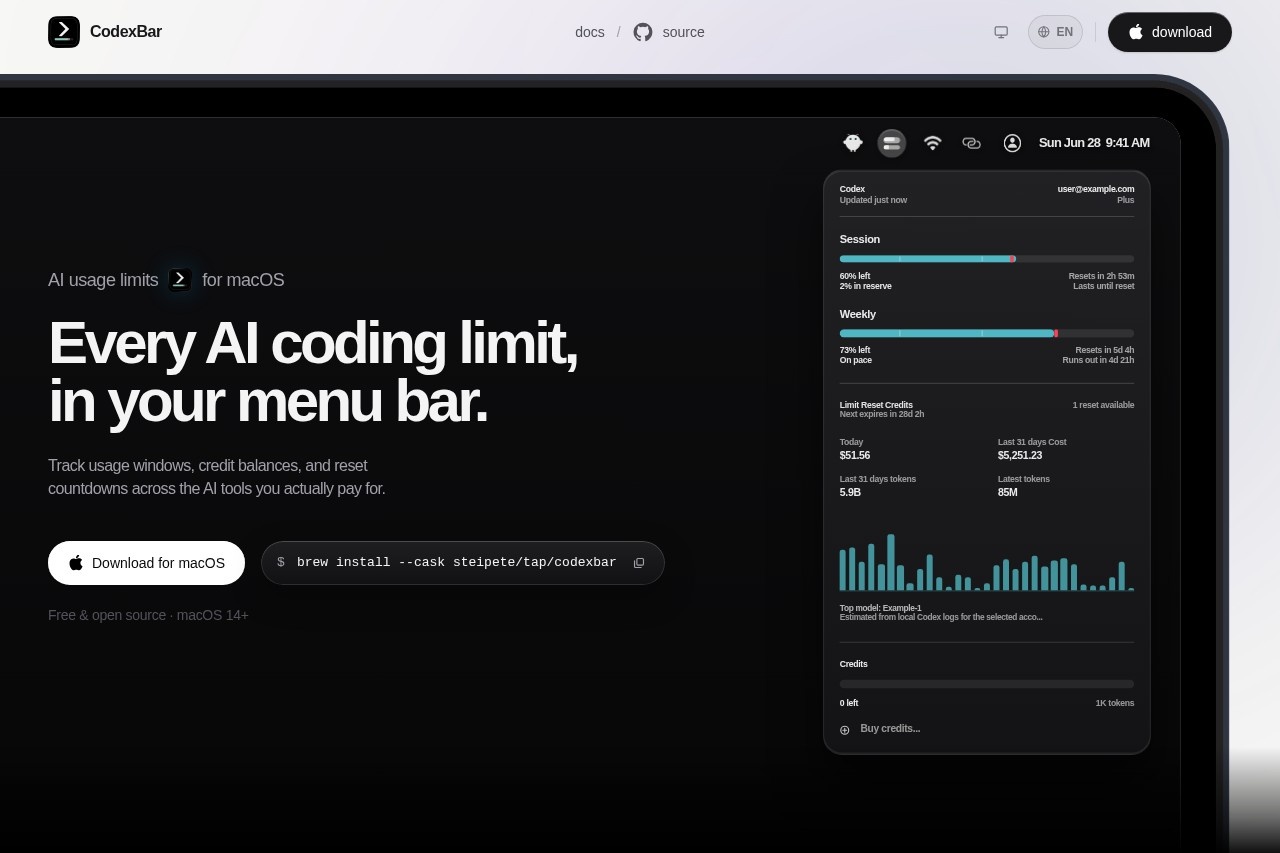
Track all your AI coding limits across 56+ AI tools directly from your macOS menu bar. Supports Codex, OpenAI, Claude, and more.
Introduction
As AI development and creation become increasingly common, developers and teams often use multiple AI platforms at once—OpenAI, Anthropic Claude, Codex, Google Gemini, and more. Each platform has its own quotas, credits, billing rules, and reset cycles. Tracking them manually is tedious and can easily lead to unexpected charges when you go over your limit. CodexBar was built to solve this exact problem: a macOS menu bar app that gives you real-time visibility into all your AI coding services at a glance. Whether you're an independent developer, an AI startup founder, or part of a corporate engineering team, CodexBar brings scattered quota information from multiple dashboards into a single view at the top of your screen—so you always know how much you have left, how much you've spent, and when it resets.
Key Features
- Multi-platform coverage: Tracks usage and credits for 56 major AI coding services, including Codex, OpenAI (GPT-4/4o/3.5), Anthropic Claude, Google Gemini, DeepSeek, Mistral, and more.
- Real-time data sync: Automatically pulls usage, remaining quota, cumulative cost, and reset time from each platform via API keys—no manual refreshing needed.
- Menu bar at a glance: All key data appears in a compact, customizable view in the macOS menu bar; click to expand a detailed list.
- Smart alerts and warnings: Get notified when a platform's quota is about to run out or hits a preset threshold, preventing service interruptions or surprise overage charges.
- Cost analytics: Automatically records daily, weekly, and monthly API costs with simple charts to help teams optimize budget allocation.
Highlights
- Extreme convenience: No need to open multiple web pages or dashboards—hover over the menu bar to see the status of all your AI services without interrupting your workflow.
- Secure and lightweight: API keys are encrypted and stored locally; the app only reads usage data and never uploads or caches your code or conversations. Memory usage is minimal and won't affect system performance.
- Highly customizable: Choose which platforms to display, sorting order, and color indicators (green for sufficient, yellow for warning, red for critical) to match your personal preferences.
- Multi-language support: Interface and notifications support Chinese, English, and more, making it easy for both domestic developers and international teams to use.
- Continuously updated: The team actively tracks new AI coding services and adds at least 2–3 new platforms every month to ensure broad industry coverage.
Who It's For
AI application developers who call multiple LLM APIs for testing, comparison, or integration and need real-time visibility into account quotas to prevent production outages. Independent creators and freelancers who use AI for coding, writing, or design and want to keep multi-platform costs within budget. Small to mid-sized technical teams that need to centrally manage shared API accounts and monitor overall usage and spending to avoid one member's overage affecting the whole group. AI educators and researchers who frequently experiment with different models' performance and costs and want historical data to support decisions. And really, anyone on macOS who relies heavily on AI tools—if you use two or more AI services, CodexBar will noticeably improve your efficiency.