Mermaid Viewer - Online Diagram Editor with Live Preview
MermaidViewer is an online diagram editor with live preview. Create and edit Mermaid diagrams effortlessly, enhanced by AI.
Introduction
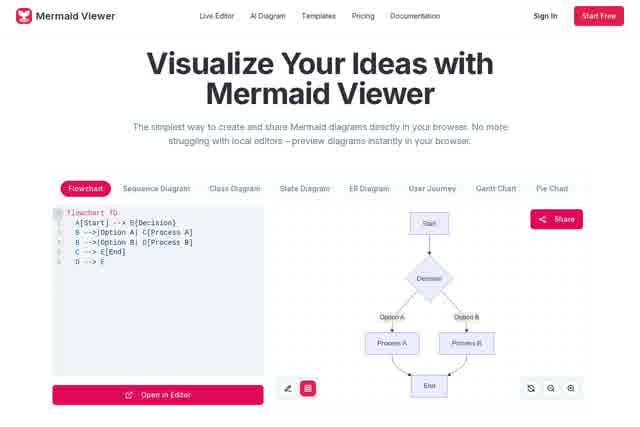
Mermaid Viewer is a free online Mermaid diagram editor designed to turn your ideas and complex processes into clear, professional diagrams. With real-time preview, seamless collaboration, and flexible export options, it provides developers, technical writers, and anyone who needs visual communication with an efficient, smooth diagramming workflow.
Key Features
- Real-time preview editor: Write Mermaid code on the left and see the diagram render instantly on the right — what you see is what you get.
- Multi-format export: Export diagrams as PNG, SVG, or PDF with a single click, making it easy to embed them in documents or presentations.
- Real-time collaboration: Generate a shared link to invite team members to view and edit diagrams simultaneously, improving communication efficiency.
- Syntax highlighting and hints: The editor supports intelligent syntax highlighting to help you write code faster and more accurately.
- Local storage: Your diagram data is automatically saved in your browser's local storage, protecting your privacy and letting you pick up where you left off anytime.
Highlights
- Unlike traditional drag-and-drop drawing tools, Mermaid Viewer is built on the powerful Mermaid text-based markup language, letting you "draw" flowcharts, sequence diagrams, Gantt charts, and more by writing code.
- This approach makes version control easy — your diagram code can be committed to Git — while allowing you to focus on logic and structure for efficient, reusable diagram creation.
- Our online platform combines these advantages with convenient collaboration and sharing features, making teamwork simpler than ever.
Who It's For
Software developers and architects can create system architecture diagrams, flowcharts, and sequence diagrams and easily integrate them into project documentation. Product managers and project managers can quickly build project timelines (Gantt charts) and user journey maps to clearly communicate project plans. Technical writers and educators can insert precise, polished diagrams into documentation, tutorials, or course materials. Students and researchers can visualize study notes, research ideas, or algorithm flows to make knowledge structures instantly clear.